Single vs Multi-Instances in TIA Portal (In-Depth Tutorial)
Jan 05, 2026
Want to make your PLC programs modular, scalable, and much easier to maintain? Then you need to master instances, because once you do, they’ll completely change the way you work in TIA Portal.
In this article, I’m breaking down everything you need to know about instances, and make sure you read till the end because I’ll share 4 pro tips including one major pitfall that you want to avoid.
Let’s dive in!
WHAT IS AN INSTANCE?
So first things first: what is an instance, and where do we actually use it?
To understand instances, we first need to understand block calls. In TIA Portal, there are two types of blocks you can call in your user program: Functions (FCs) and Function Blocks (FBs).
Both FCs and FBs consist of two main parts:
- The block body – this is where your actual logic lives: your ladder logic (LAD), function block diagram (FBD) or structured control language (SCL)
- The block interface – where you declare your inputs, outputs, inouts, as well as temporary variables
But there is one critical difference between them.
Only Function Blocks have static variables.
 Functions and Function Blocks in TIA Portal
Static variables are what allow an FB to remember values between calls. For example, if you have a step number or sequence state declared as a static variable, its value is retained from one PLC cycle to the next. And to remember those values, to retain those states - you need memory.
And that is why every time you call an FB, an instance data block is required.
The instance DB contains the static memory and is unique to that specific FB call.
 The instance of a Function Block
You can think of an instance as the data container of a function block. It holds the memory area that belongs to that FB. Without an instance, a function block would not be able to retain any values from one cycle to the next.
A simple example is a counter that increments by one on each rising edge. This behavior is only possible in a function block, because the counter must be declared as a static variable and stored in the instance DB, allowing it to retain its value from one cycle to the next.
Another helpful way to look at it is this:
- The Function Block is the blueprint = the logic you designed
- The Instance DB is the brain = the memory that remembers the current states
And every FB call gets its own brain.
Now that we understand what an instance is, let’s look at how instances are created in TIA Portal and explore the differences between single and multi-instances.
SINGLE VS MULTI-INSTANCES
The example I'll be using to illustrate single vs. multi-instances is based on a TIA Portal project for a moulding line. If you’re not familiar, a moulding line is a process where liquid is poured into moulds, cooled until it solidifies, and then separated from the moulds to move on to a buffer system or a packaging line.
The project tree (see screenshot below) shows us the different process modules for the line - upstream, conditioning, depositing, settling, cooling, and so on.
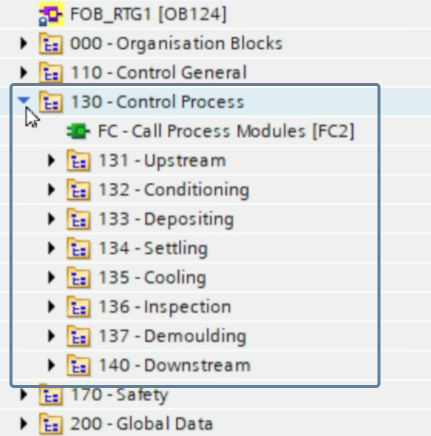 Process Modules
We also have some general modules that handle overall line control, recipes, power supply, air supply… etcetera.
 General Modules
Looking closer at the equipment modules, the main cooling block is supposed to contain all blocks for controlling the cooling process of the application. Right now, it’s empty - no block calls yet.
 No blocks added yet to "FB - Call Process Cooling"
To show you how instances are created in TIA Portal, I've dragged a control block for cooling from the library group into Network 1.
Now, remember what we discussed earlier: every call of a function block requires an instance.
Here we go: TIA Portal automatically asks which type of instance we want:
- Single instance
- Multi-instance
- or Parameter instance
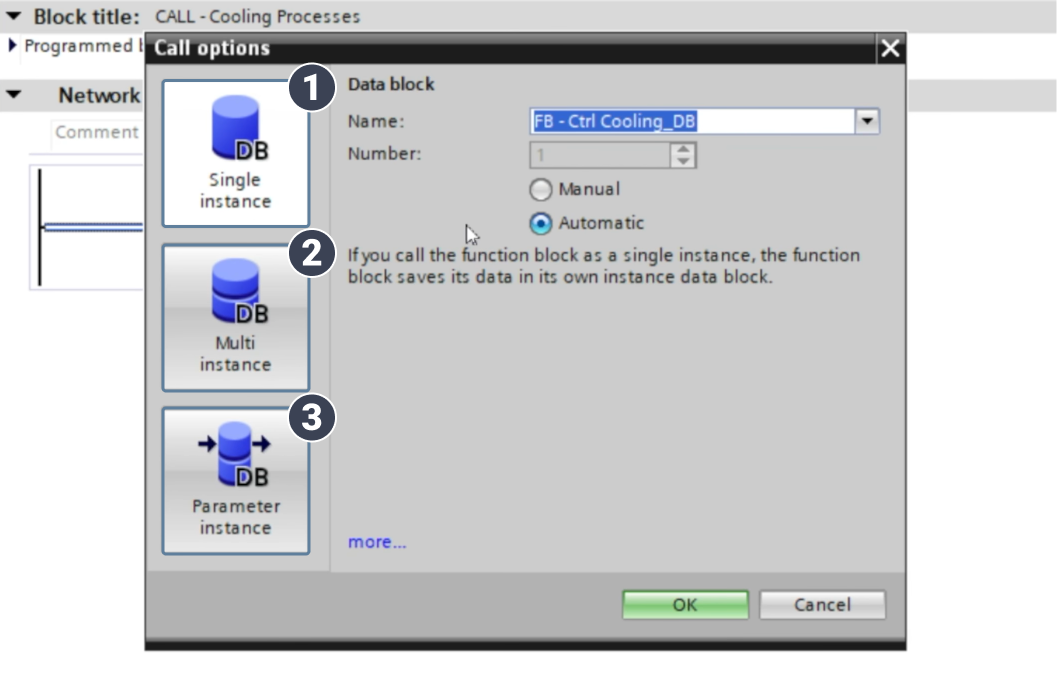 Instance selection in TIA Portal
We’ll ignore Parameter instances, because they’re rarely used in real-world applications. I mean to be honest, I have never had a use for it in my 20+ years of programming Siemens applications. We’re going to focus on single and multi-instances.
Let’s start with a single instance and rename it to “iDB – Ctrl Cooling 1”.
A new block call is now created in network 1 containing:
- the function block
- the associated single instance DB
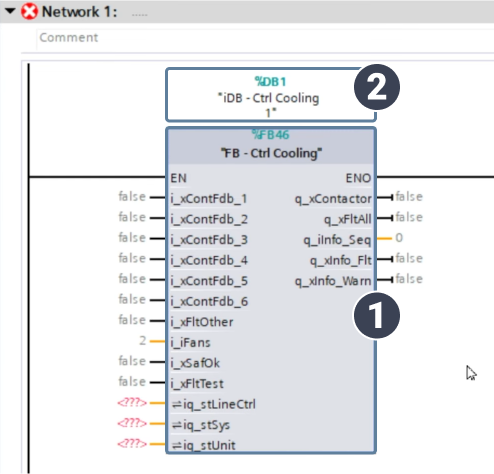 A function block call together with its single instance DB
And in the project tree, a brand-new instance DB has been created under the Cooling module group.
 Instance DB in the project tree
Now imagine that we have not just one, but 3 identical cooling units. We can call the FB for the other two units by simply copy-pasting Network 1 twice and renaming the instance DBs.
So you might be wondering:
“Hans, why rename the instance?"
"Why have three instances?"
"Can’t we just reuse the same one from the first block call?”
Here’s why you need a unique instance DB for each call. The instance DB remembers the static values of the FB - sequences, counters, and other persistent data. If all three cooling units shared the same DB, they would overwrite each other’s values, each other’s sequences causing unpredictable behavior. That is why each FB call must have a unique instance DB.
At this point, three calls for the cooling unit have been created, each with its own single-instance DB. In the project tree, these three instance DBs appear under the Cooling module group.
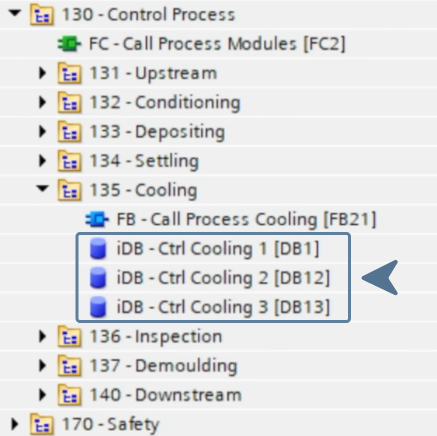
However, the setup isn’t complete yet. The main cooling block, "FB - Call Process Cooling", still needs to be called; otherwise, the three cooling blocks it contains will never be executed. This is done inside the parent block "FC - Call Process Modules", where "FB - Call Process Cooling" is called using a single instance named "iDB - Call Process Cooling".
 Call of the cooling module inside "FC - Call Process Modules"
And just like that, we get another instance DB in the project tree. Together with the three we already had, that brings us to four instance DBs in total. Remember that number - we’ll come back to it in a moment.
 Each single instance takes up a space in the project tree
So this is how single-instance DBs work: every FB call creates its own physical DB in the project tree.
Now, let’s switch gears and take a look at multi-instances.
We start with the same main cooling block. In Network 1, we add “FB - Ctrl Cooling” again from the library, but this time we select multi-instance and rename it to “instance_Ctrl_Cooling_1”.
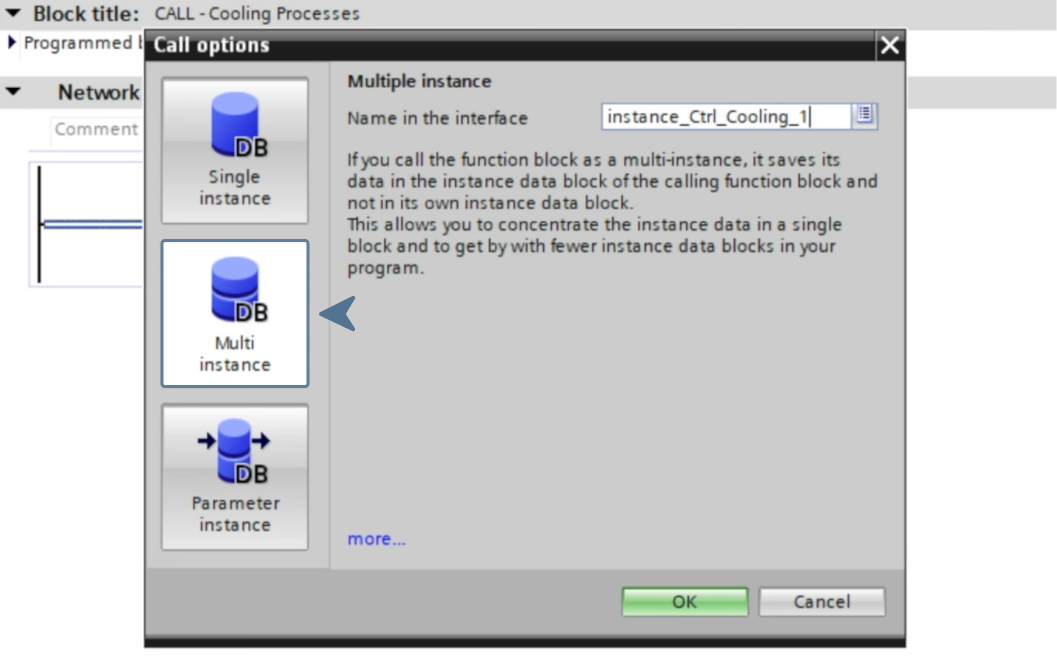 Creating a multi-instance in TIA Portal
So again, a new block call is now created in network 1 containing:
- the function block
- the associated multi-instance DB
 A function block call together with its multi-instance DB
In this case, no new DB has been created in the project tree.
So you might wonder “Where’s the instance? Where has it been created?”
If we open the block interface of the parent block "FB - Call Process Cooling", you can see that the instance is nested inside the static area of the parent blocks block interface.
 A multi-instance nested inside the static area of the parent block
And that is the key difference between single and multi-instance:
- A Single instance stores its data inside a separate, external DB (in the project tree)
- A Multi-instance stores its data inside the parent block’s instance DB, not separately
So if we repeat the same setup as before and assume we have three cooling units, but this time we call them all as multi-instances, you’ll notice something important. The parent block now contains three instances inside the static area of its block interface, while the project tree shows no additional DBs.
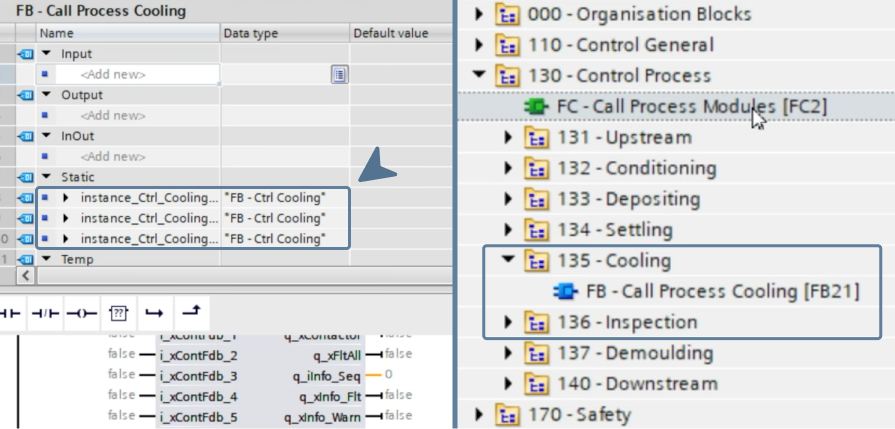 The multi-instance block calls with no extra DBs created in the project tree
Next, just as before, the cooling module is called inside the process module block, resulting in one additional single instance DB created in the project tree.
Compare this to the earlier example using only single instances: there were four DBs then, whereas now there is just one.
 Extra DBs in project tree with multi-instances (left) vs. single instances (right)
That’s the difference.
And now imagine a larger, more complex application with hundreds of block calls. The project that uses multi-instances wherever possible will be far more streamlined and much easier to navigate, simply because there are far fewer blocks to manage.
That’s the biggest advantage of multi-instances: they keep your block count to a minimum, resulting in an application that’s cleaner, more compact, and easier to understand.
4 PRO TIPS
Now that you understand the difference between single and multi-instances, I want to finish strong with 4 insider tips on instances including 1 pitfall that you want to avoid.
TIP 1: Re-usable function block -> Always multi-instances
The first tip is less of a tip and more of a golden rule. When you create reusable function blocks, you should always use multi-instances inside that block, never single instances.
Why? Because a reusable block must keep its data separate for each use. With multi-instances, those instances are stored inside the instance of the calling block, so every call gets its own unique states and values.
If you use single instances inside a reusable block, the data is stored in fixed, separate instance DBs. That means multiple uses of the same block can end up sharing states, values, and sequences, which breaks reusability and leads to unexpected behavior.
TIP 2: Array of multi-instances
The second tip is about streamlining your PLC application even further by using an array of multi-instances.
In the TIA Portal project , three separate multi-instances have been created for the cooling units: instance_Ctrl_Cooling_1, 2, and 3. All of them are declared in the static area of the parent block’s interface. Since each instance occupies its own line, three cooling units already result in three separate entries in the static area.
 3 multi-instance calls using 3 separate entries in the static area
But here’s the trick: this setup can be made even cleaner by using an array.
Instead of declaring three multi-instance variables with data type "FB - Ctrl Cooling"
- We declare one single variable as an Array[1..3] of "FB - Ctrl Cooling"
- For each block call, a single array element is selected as the instance
 3 multi-instance calls using only one entry in the static area
And that’s all it takes.
One single array declaration replaces multiple individual multi-instance entries, resulting in a much cleaner and more scalable block interface.
One quick note: the use of multi-instance arrays off course only makes sense when you’re calling the same function block multiple times. But imagine you have 10 cooling units, image you have 100 cooling units. With an array of multi-instances, you still only have one line in the static area instead of ten or a hundred.
The result is a much cleaner, less cluttered application that’s easier to read, easier to maintain, and easier to scale.
TIP 3: Keep instance data local
Tip number three, and this is a very important rule in PLC programming (even though I still see it being ignored all the time...) is this: instance data should only be used inside the function block that owns it. It should never be used in external logic somewhere else in your application, and it should definitely never be used directly on an HMI.
An instance should be viewed as memory for that block only, nothing more. An instance DB is the private memory of a function block.
For example, in Network 1 there is instance_control_cooling_1. What should never be done, is accessing that instance from another network, say Network 4, and adding logic such as:
If the variable #instance_Ctrl_Cooling_1.xFltAllFans is TRUE, then set an output.
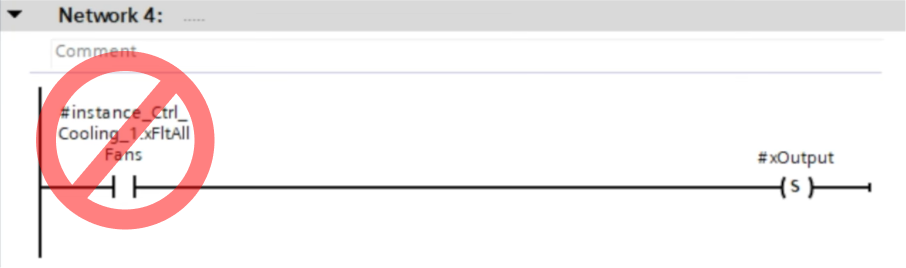 Never access instance data outside its owning block
This should be strictly forbidden. I’d even go so far as to say Siemens should make the software generate a compilation error if you try to do this.
Once other blocks start reading or writing instance data directly, the function block is no longer self-contained. Any internal change can suddenly break other parts of the program, and the reusability of the block drops immediately.
Any important data that needs to be accessed from different parts of your application or displayed on your HMI, should always be stored in global DBs, never in instance DBs.
TIP 4: When NOT to use multi-instances (pitfall)
The final tip is about a pitfall when using multi-instances.
So far, I’ve been talking about how great multi-instances are and why you should use them. But now, I want to show you when NOT to use them.
Consider the same sample project, but this time with only a single cooling unit. Networks 2 and 3 are removed and the extra instances are deleted from the block interface.
Now assume the cooling module also requires a PID controller. This block is added from the library in Network 2 as a multi-instance named #instance_Ctrl_Cooling_PID. To keep the air dry in the cooling section, a dehumidifier block is added in Network 3 as another multi-instance, #instance_Ctrl_Dehumidifier.

At this point, we have three different multi-instances nested in static area of the parent block, iDB – Call Process Cooling. That’s an important thing to remember.
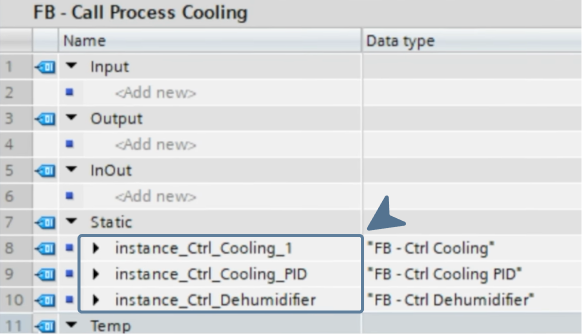
Now, let’s say we need to make a change in one of the cooling blocks, for example the cooling control block. We open it and add a new variable in its static area, called rTemperatureScaled, and declare it as a REAL.
 New static variable inside the "FB - Ctrl Cooling"
After closing the block, the instance turns red, meaning it needs to be updated. We right-click and select “Update Interface”.
 Updating the interface of an instance after changes
Next, if we look at the parent block - the cooling module call - we’ll see that both the block and its instance DB are also red. Why? Well, because we changed the multi-instance of the cooling control block, which is part of the static area. To update, we right-click and select “Update Block Call”.
 Updating the block call of the parent block
Here’s the catch: updating the parent block will initialize the complete static area of that parent block. This means all 3 multi-instances that it contains, not just the one you changed. That means the Cooling PID and Dehumidifier instances are also initialized.
Offline, this isn’t a big deal, but online, it can cause serious problems. Any sequences, steps, or values in those blocks will be reset to their initial values (usually zero), leading to unexpected behavior.
So, how do we avoid this problem?
The answer is to use single instances instead of multi-instances when you have multiple independent blocks inside the same parent block. We remove the multi-instances from the parent block’s static area and create new single instances for each of the three block calls.
Now, if you make an online change to the cooling block, it only affects that block’s single instance. The Cooling PID and Dehumidifier blocks remain completely unaffected, keeping their sequences, steps, and values intact. Even at the parent block level, everything stays consistent, so no other blocks are accidentally reset.
The disadvantage of this approach is that your project tree will have more DBs. I usually manage this by creating a folder called “Instances” under the module and moving all instance DBs there.
 Nesting instance DBs under an "Instances" group
When the folder is minimized, it takes up just one line, keeping your project tree neat and organized.
So there you have it - instances in TIA Portal. I hope this tutorial gave you a clearer understanding of what instances are and why knowing the difference between single and multi-instances can make a huge difference in how you structure and scale your PLC applications.
And if you liked this tutorial, then you’re absolutely going to love my free guide. As I mentioned before, I put a lot of emphasis in all my training on being a structured, organized PLC programmer, and if you want to see what truly organized PLC programming looks like in TIA Portal, then go and download my free guide by clicking the link below this article.
Thanks for reading, and stay structured.
-Hans

Download your FREE GUIDE NOW!
5 Simple Steps to Drastically Improve your PLC Program Structure in TIA Portal by Hans Schrynemakers
This is one of my most popular guides, and I’m happy to share it with you for free! Inside, you'll learn about:
- The #1 Way to Eliminate Messy PLC Programming in Just 5 Easy Steps!
- The Proven Method for Building Scalable, Future-Ready PLC Applications in TIA Portal.
- Discover How Modular Design and Structured Data Can Eliminate Costly Errors and Downtime.
- Break Free from Unstructured Programming - Build Clear, Modular TIA Portal Applications with Confidence.
- Master the Techniques that Separate Amateur PLC Programmers from Professionals.